AI Automation from Flocuity
AI automation for small business, built for the jobs that eat up your week.
We build software and AI tools for small businesses. Each one takes a single job off your plate, like putting together quotes, getting bills into your books, figuring out commissions, or answering the questions customers ask every day. They work with the software you already use, they follow your rules, and they only do what you’ve told them they can.
Your data is never used to train AI models.
- A free first call
- A fixed quote before any work starts
- Start with just one job
Before you got in
7:45 AM
14 bills read from your inbox
2 for you12 are ready to go into QuickBooks Online. 2 need a look: one is from a new vendor, and one is 30% higher than last time.
11 customer emails
2 for youIt answered 9 simple questions about hours, prices and orders, as you’ve allowed. 2 are waiting for you: a refund over $500 and a custom order.
3 payment reminders drafted
3 for youHarbor Dental and two others are past due. The reminders are written and ready for you to send.
Weekly report written
DoneSales are up 6% from last week, and Friday’s payroll is covered.
7 waiting on you
It only does what you’ve allowed, and it never moves money.
Examples
Some of what we can build
Good AI automation for small business starts with one job done well. Below are some examples, grouped by the part of the business they help with. Each one is built around the way you already work. AI handles the reading and writing, and regular software handles the math, so the numbers always add up.
Winning the work
Getting quotes out faster and answering customers sooner.
Quotes in minutes
Trade the paper and calculator for a quoting tool that knows your prices, labor rates and markup. Pick the type of job, answer a few questions, and send a priced quote the same day. It can even start from your notes or a photo of the job.
Every lead answered the same day
New inquiries get a quick reply that sounds like you, and they land on your to-do list with what the person asked for. Nobody waits three days to hear back.
Everyday emails, answered
It answers the questions you get every day, like your hours, prices, availability and “where’s my order?”, using your own policies and price list. Anything unusual comes to you.
What customers are telling you
Every month it reads your reviews, surveys and customer emails and tells you what people keep bringing up, good and bad, with their actual comments. It can draft replies to reviews, too.
Doing the work
Scheduling, job costs and the paperwork you can’t let slide.
Scheduling that fits your business
Plan shifts around your busiest days and hours, or match crews to jobs by skill and location. You see what each week will cost in payroll before you post the schedule.
Project costing as you go
Track labor, materials and subcontractors against the quote while the job is underway. If a job starts running over budget, you’ll know while there’s still time to do something about it.
Stay on top of renewals and compliance
Keep every license, permit, insurance policy and contract in one place, with its renewal date and what it requires. You get a reminder well before anything expires, and AI can read the documents to find the dates for you.
A handbook your team can ask
Your staff can ask things like “How do we handle a return?” or “What’s the deposit for a party of 20?” and get your answer, straight from your own documents, with a link to where it came from.
Keeping the books
Less typing, faster payments and cleaner books.
Bills and receipts, read for you
Forward a bill or snap a photo of a receipt. It pulls out the vendor, amount, due date and category, checks them against what you normally pay, and gets everything ready for QuickBooks Online or Xero. You just approve it.
Polite reminders for late invoices
It keeps track of which invoices are overdue and how each customer usually pays, then writes a reminder that sounds like you. The first one is friendly, and later ones get firmer. You decide when to send.
Commissions without the spreadsheet
It works out each salesperson’s commission from your sales using your plan’s rules, tiers and splits included. Everyone gets a statement they can check, and the totals are ready for payroll.
Messy books, cleaned up
Months of uncategorized transactions get sorted the way your accountant would do it. It follows your rules first, then your past choices, and gives you a short list of anything it isn’t sure about.
Knowing your numbers
This is where Flocuity started: helping owners see their numbers clearly.
A KPI dashboard made for you
See the numbers you actually watch on one screen, updated every day from your books, sales system, payroll and anything else you use. You pick what goes on it.
Which work actually makes money
See your profit margin by job, product, customer and location, with labor and overhead included. It helps you price with confidence and know which work is worth going after.
The Monday report, written for you
A short summary of sales, cash, what’s due and what changed since last week, written in plain English. It’s in your inbox before you get to your desk.
Ask about your numbers
Ask something like “What did we spend on subcontractors last quarter?” and get the answer from your books, along with the transactions behind it.
Don’t see your job here? We can also help with things like inventory and reordering, new-hire paperwork, job checklists and route planning. If you’ve ever said “I wish I didn’t have to do this by hand,” tell us about it.
Before and after
From paper and spreadsheets to tools that do the work
Here are four jobs a lot of small businesses still do by hand, and how they change once there’s a tool for them.
Quotes
- Before
- Someone works it out on paper with a calculator and last year’s price list. The quote goes out two days later, if it goes out at all.
- After
- You pick the job and answer a few questions. A priced quote, with your markup already built in, goes out the same day.
Job costs
- Before
- You find out a job lost money after it’s finished, when it’s too late to fix.
- After
- You see labor and materials compared to the quote while the job is still going, so you can fix problems early.
Commissions
- Before
- Someone builds a spreadsheet at the end of every month, and then there is an argument about whose numbers are right.
- After
- Each person’s commission is calculated by your plan’s rules, and they get a statement they can check for themselves.
Renewals
- Before
- A license expires because the only reminder was in someone’s head.
- After
- Every renewal is tracked. You get a reminder weeks ahead, with the paperwork already started.
Still doing one of these by hand? Tell us which one.
Dashboards and profitability
Your numbers, on one screen
We build dashboards around the numbers you actually use to run your business, and they update every day on their own. You’ll see which jobs, products and customers make money once labor and overhead are counted. And a few plain sentences tell you what changed, so you don’t have to study a chart to find out.
- Built around your KPIs
- Profit margin by job, product, customer and location
- Updated every day from the software you already use
- Click any number to see the transactions behind it
This week
Monday to Sunday
- Revenue
- $48.2K
- Up 6% from last week
- Gross margin
- 41%
- Down 2 points from last week
- Jobs completed
- 23
- 3 more than last week
- Days to get paid
- 18
- 3 days faster than last week
Margin by type of job
- Water heaters52%
- Service calls44%
- Repipes31%
- New construction12%
What changed
Margin dropped 2 points because three repipe jobs were quoted in August, before copper prices went up. New construction is still your lowest-margin work.
How it works
From a first call to a tool you use every day
Custom AI solutions used to be something only big companies could afford, with months of meetings before anything happened. Ours start with a phone call about one job.
- 1
A free first call
A 30-minute call where you tell us about the job that takes up too much of your week. We’ll ask how it’s done now, what software is involved, and what a good result looks like to you.
- 2
A plan and a fixed quote
You get a one-page plan in plain English that says what it will do, what it won’t, how we’ll know it’s working, and what it costs. The price is fixed, so there’s no hourly bill creeping up.
- 3
Built and tested on your own work
We build it to work with your software, then test it on real examples from your business, like last month’s bills or jobs. You see how well it does before it handles anything new.
- 4
Live, and we look after it
At first, everything comes to you for approval. Once you trust it, you can decide what it’s allowed to do on its own. We keep it running and up to date.
Built to be trusted
You stay in charge
We hold everything we build to the same rules as Flocuity’s own software.
Nothing happens without your OK
Everything starts as a draft for you to approve. You decide what it can do on its own, one job at a time, and you can change your mind whenever you want.
Your rules come first
Tell it once that the payment to your landlord is rent, and it will file it as rent every time. The AI only fills in what your rules don’t cover, and it tells you when it isn’t sure.
It shows its work
Every answer points to where it came from, whether that’s a bill, an email or a page in your handbook. Everything it does is logged, so you or your accountant can check it anytime.
Your data isn’t used to train AI
We never use your data to train AI models, and we only work with AI providers whose business terms say they won’t either.
It only sees what it needs
Each tool gets access to only what its job requires. If it just needs to read something, it can’t change it. A tool that reads your bills never sees your bank balance.
It never moves money
Paying bills and sending refunds stays with you. Nothing we build can move money, and the same goes for Flocuity itself.
Who builds it
Built by the people who built Flocuity
Flocuity is our own software for managing small business cash. Every morning it reads a business’s bank history and books, sorts the transactions, and forecasts the bank balance 13 weeks ahead. We put the same care into everything we build for you.
- It connects to banks, QuickBooks Online, Xero, Square and Stripe, but can only read from them
- When it sorts transactions, your own choices come first, then your rules, then your books
- Every number shows where it came from
- Nothing in it can move money
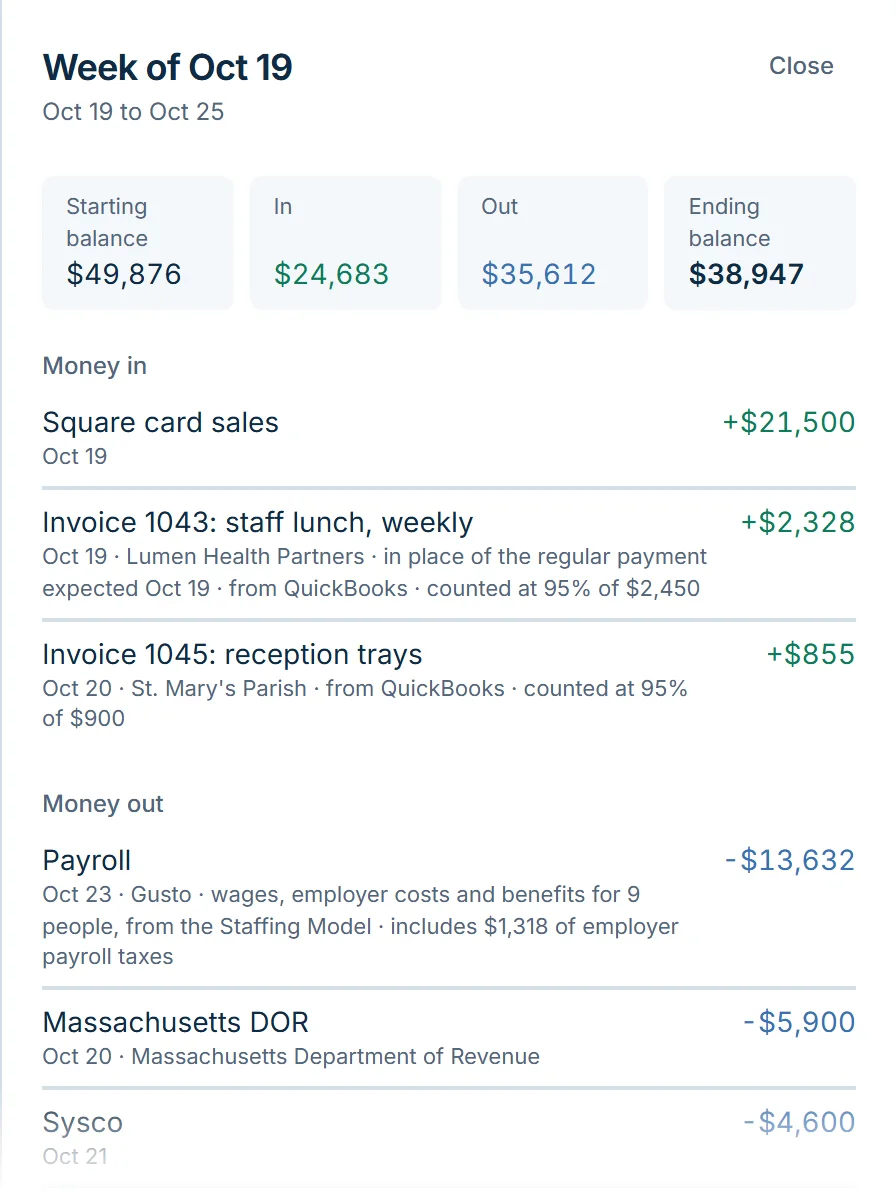
Flocuity’s cash forecast. Every line shows where it came from.
Questions owners ask
- Do I need to be technical?
- Not at all. You explain how the work gets done today, in your own words, and we take care of the technical side. What we build shows up in places you already use, like your email, your books or a spreadsheet, or on a simple page of its own.
- Is all of this AI?
- Not all of it. We use AI for reading, writing and sorting, and regular software for the math in a quote, a commission or a profit margin. Most of what we build uses both.
- What does it cost?
- It depends on the job, so you get a fixed quote before any work starts. There’s one price to build it and a monthly fee to run and maintain it, which includes the cost of the AI service. You’ll know the full cost before you decide.
- How long does it take?
- A first tool takes weeks, not months. We’d rather do one job well and show you the time it saves before moving on to the next one.
- Is my data used to train AI?
- No. We never use your data to train AI models. We only use established AI providers whose business terms keep your data out of their training, and your plan will say which one we’re using. Each tool only gets the information its job needs.
- What if it gets something wrong?
- You stay in control. At first, everything comes to you for approval. It tells you when it isn’t sure, your rules always come first, and everything it does is logged, so anything that needs a fix is easy to spot and correct.
- Which software can it work with?
- Most of what small businesses use, including QuickBooks Online, Xero, email, spreadsheets, point-of-sale and payment systems, scheduling apps and customer lists. If your software allows other programs to connect to it, we can usually work with it. If it doesn’t, we’ll tell you on the first call.
- Can you replace a spreadsheet we’ve outgrown?
- Yes, and it’s often the best place to start. If a spreadsheet runs part of your business, like quoting or commissions, the rules are already written down. We turn it into a tool that’s faster to use and much harder to break by accident.
- Can you build something that isn’t on this page?
- Very likely. These are just examples. A job is usually a good fit if it comes up often, follows rules you could explain to a new hire, and involves software or documents. Tell us about yours.
- Do I need a Flocuity plan?
- No. AI Automation is quoted on its own. If you want the forecast as well, the Custom plan on our Pricing page bundles everything in Plus with the work we build for you.
Get started
Tell us what you’d hand off first
A couple of lines is plenty. We reply within three business days, usually sooner.
What happens next
- 1We get back to you within three business days with a question, or a straight answer about whether we can help.
- 2We have a free 30-minute call to talk through the job and the software it involves.
- 3You get a one-page plan and a fixed quote, and then you decide.
Or just email us
Prefer email, or want to attach an example? This address goes to the same people as the form.
Flocuity also forecasts your cash
Our own software gives small businesses a rolling 13-week cash flow forecast, so you can see tight weeks coming before they arrive.