Cash flow forecasting for accountants and bookkeepers
A forecast you can stand behind
What you get
The Detailed view is yours
Every assumption in the open
Growth, a slow or busy month, payment timing and one-off items are listed by category. Change one and the forecast updates at once.Scenario Planning is on Plus.
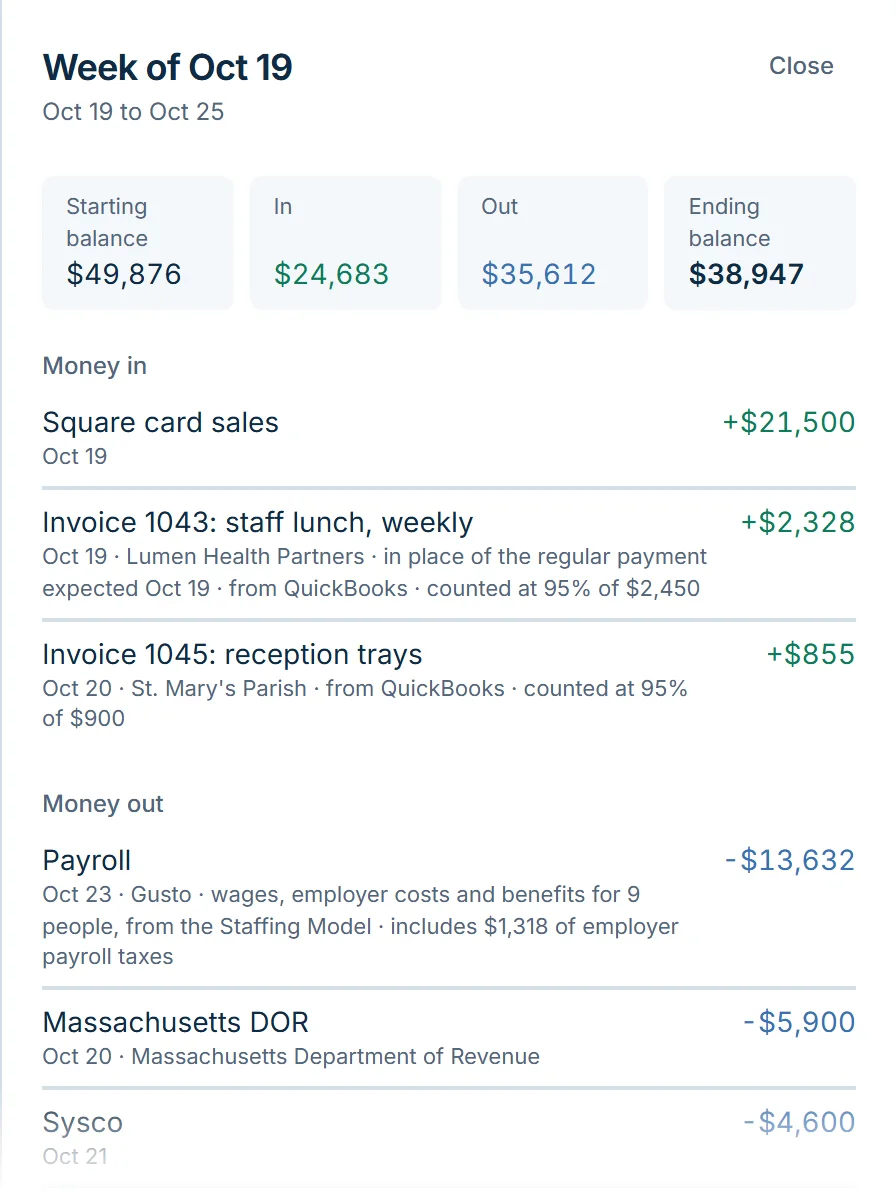
Traceable to the line
Open any week and see each item in it: the recurring bill, the invoice, the paycheck, the tax payment.
Forecast against actual
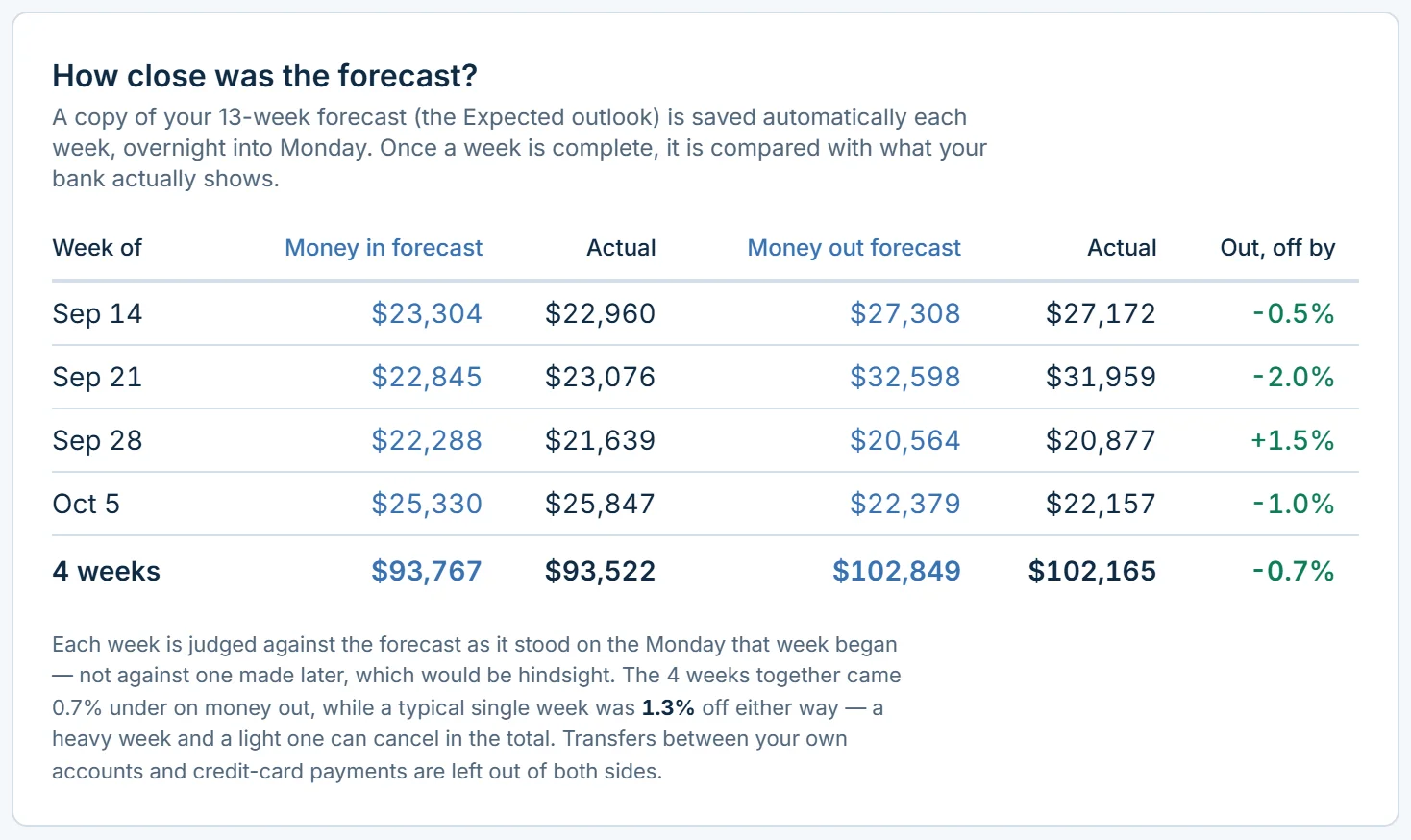
Flocuity keeps a record of what it forecast and compares it with what happened, so you and your client can see how far to rely on it.
Out to Excel, in from the books
Reports by category and period, and the forecast itself, export to a spreadsheet for your own workpapers. QuickBooks Online and Xero connect read-only, so nothing is ever written back to the books.Reports are on Standard and Plus; the forecast exports on every plan.
A Lender Package you didn’t have to assemble
A twelve-month projection, a cautious one beside it, the business debt schedule, receivables and payables aging, and a page saying where every figure came from and how fresh it is. Download it as Excel or print it.On Plus.
Who actually pays late
Flocuity reads which invoices were paid and when, and forecasts the open ones with the customer’s individual payment pattern. Every date says which record it came from, and you can override any customer by a number of days.On Plus, with QuickBooks Online or Xero connected.
Taxes and payroll modeled properly
Estimated income tax from year-to-date profit, payroll and sales tax on their real schedules, and the Staffing Model with employer taxes.The Staffing Model is on Standard and Plus.
Your seat is free
A client invites you as an editor or a viewer. There’s no charge per user, and one login moves between all your client businesses.Standard includes 2 who can edit and 1 who can view, and Plus has no limit. Basic is for one person, so it has no seats to share.
Forecast against actual
See how far to rely on it
Every Sunday night Flocuity keeps a copy of the 13-week forecast. Once a week is over, it sets what the forecast said beside what the bank shows, money in and money out, week by week, so you can see whether it runs high, low or close.
Swipe the picture sideways for all of it.
The 13-week grid
The spreadsheet you’d build, filled in
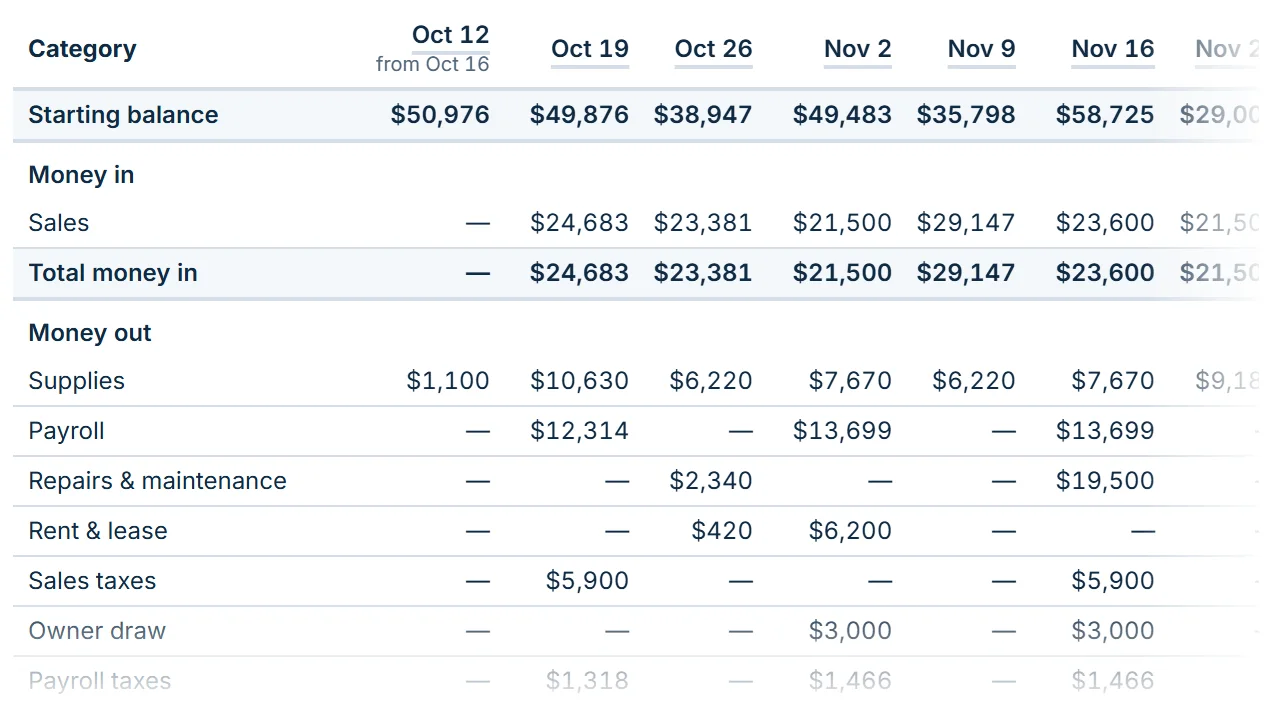
A column for every week and a row for every category, or for every customer and vendor, from the starting balance down. Open any week for each payment in it and where it came from, and export the grid to Excel for your workpapers.
How it works with clients
Getting your clients started
Your client signs up and invites you
The owner runs the short setup, then adds your email under Settings. You get a link, and you’re in, with the role they chose. How invitations work.
You set it up for them
Create the business yourself, load the history, connect their QuickBooks Online or Xero so open invoices and bills come in on their own, tune the assumptions, then, on Standard or Plus, invite the business owner as an editor or a viewer. You stay the account owner, with the billing. The first thing they see is a forecast you’ve already checked (a viewer starts in the Simplified view).
Running a practice?
If you’d like to bring several clients on, tell us about your practice. We’d love to hear how you work.
Try it on one client
Pick the client who calls you about cash most often. Setup takes about ten minutes with a bank export in hand.